

Immediate Threats to Mikrotik Routers
We recently observed a concerning incident involving a threat group specializing in exploiting vulnerable Mikrotik routers running outdated RouterOS.
Critical Severity
This vulnerability requires immediate attention. Affected systems should be patched or mitigated as soon as possible.
Alert: Immediate Threats to Mikrotik Routers
Threat Summary
We recently observed a concerning incident involving a threat group specializing in exploiting vulnerable Mikrotik routers running outdated RouterOS. Within minutes, we detected the group attempting to brute-force access via Telnet.
Evidence of Attack Activity
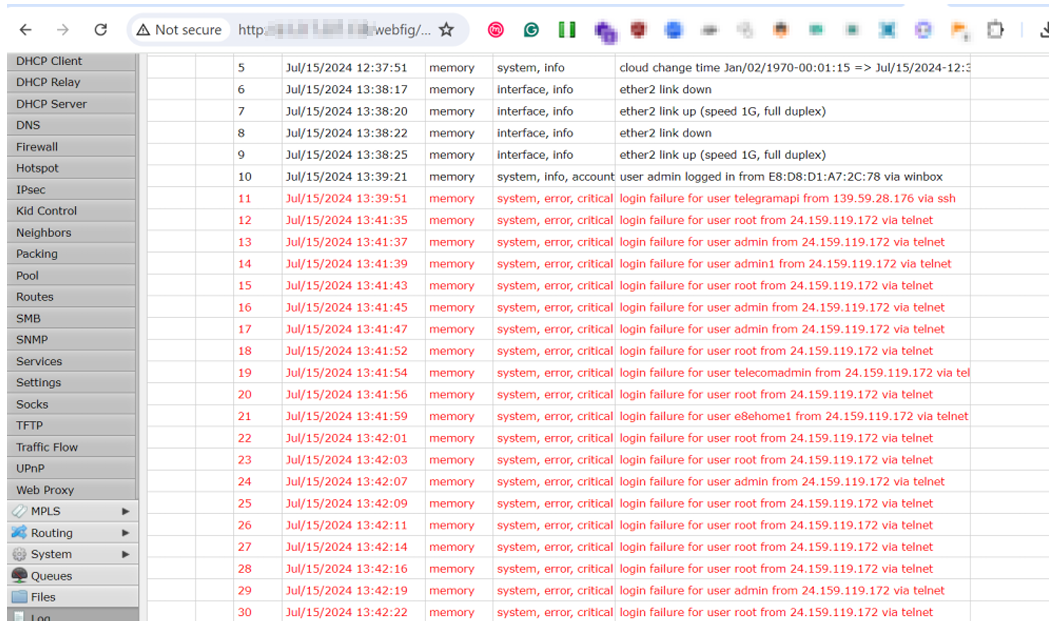
The screenshot above shows the initial reconnaissance and brute-force attempts targeting exposed Mikrotik devices.
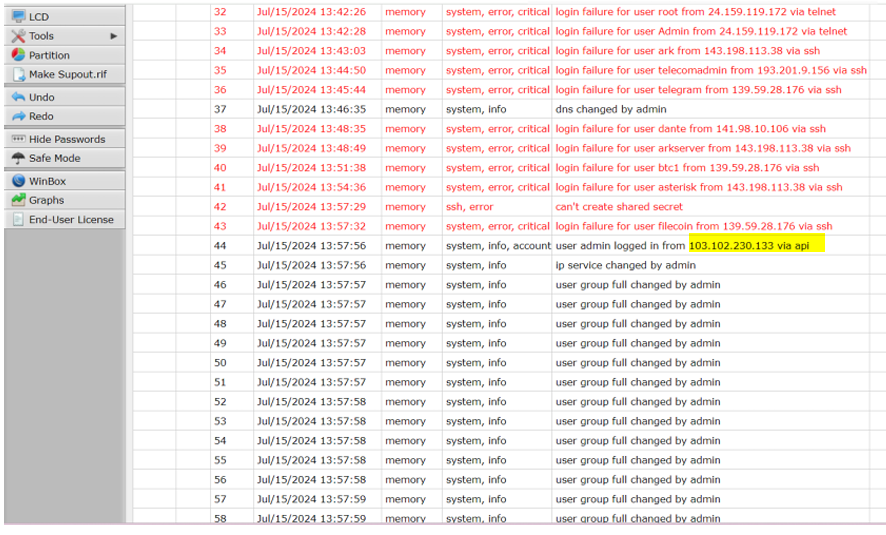
Further analysis revealed systematic scanning patterns targeting management interfaces.
Attack Details
Attack Vector
- Telnet brute-force attacks
- Exploitation of known RouterOS vulnerabilities
- Default credential abuse
Observable Activity
- Rapid login attempts on port 23 (Telnet)
- Scanning for management interfaces
- Attempted exploitation of CVE-2018-14847 and similar
Affected Devices
| RouterOS Version | Risk Level | Status |
|---|---|---|
| < 6.42 | Critical | Actively exploited |
| 6.42 - 6.48 | High | Vulnerable |
| 6.49+ | Medium | Patch available |
| 7.x | Low | Most secure |
Consequences of Compromise
- Botnet Recruitment: Compromised routers used in DDoS attacks
- Traffic Interception: Man-in-the-middle attacks
- Cryptomining: Resources hijacked for cryptocurrency mining
- Lateral Movement: Gateway to internal networks
- Data Theft: Capture of network traffic
Immediate Actions Required
Critical Steps
- Update RouterOS: Upgrade to the latest stable version immediately
- Disable Telnet: If not needed, disable Telnet service completely
- Change Credentials: Use strong, unique passwords
- Firewall Rules: Restrict management access to trusted IPs
- Enable Logging: Monitor for suspicious access attempts
Configuration Commands
# Disable Telnet
/ip service disable telnet

# Restrict Winbox access
/ip service set winbox address=192.168.0.0/24

# Change default admin password
/user set admin password=YourSecurePassword
Monitoring
Watch for:
- Unexpected configuration changes
- Unknown scheduled scripts
- Unusual traffic patterns
- Failed login attempts
WhiteHat NG Infrastructure Alert